TotaLivra Lite
Lightning-Fast EPUB Translation. Powered by Apple Silicon. Fully Offline.
TotaLivra Lite for Mac
Studio-Grade Literary Translation with Local LLMs. Fully Offline.
Core Features
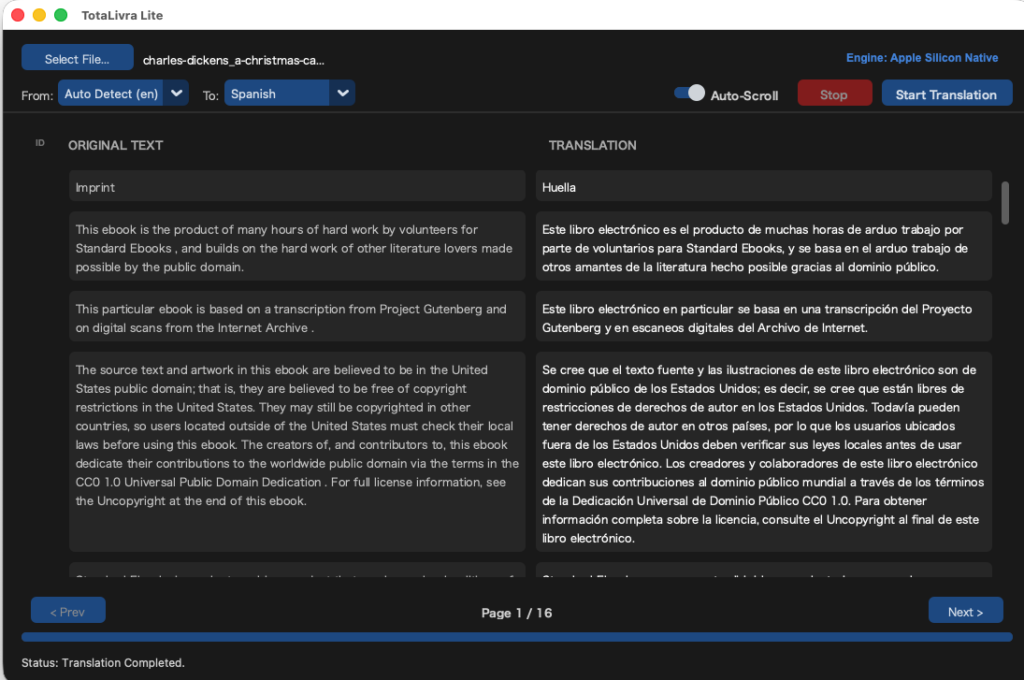
- Blazing Fast Native Engine: Why wait? TotaLivra Lite bypasses massive AI models and directly utilizes macOS’s built-in translation API (Neural Engine). Experience ultra-fast, seamless document and eBook translation without the heavy processing overhead.
- 100% Offline & Private: No cloud APIs, no subscriptions, and zero data tracking. TotaLivra Lite works entirely on your local machine using Apple’s system dictionaries, ensuring your private documents never leave your Mac.
- Flawless EPUB Repacking: Simply drop an eBook, and get a translated eBook back. The app extracts, translates, and seamlessly repacks your
.epubfiles while perfectly preserving original images, chapter structures, and table of contents. - Incredibly Lightweight: You don’t need a high-end workstation. Because it leverages native macOS capabilities, TotaLivra Lite runs smoothly and efficiently on any standard Mac, including entry-level M1 MacBook Airs with 8GB of RAM.
Download
[System Requirements]
Note: TotaLivra Lite relies on macOS built-in translation dictionaries. You may need to download the required language packs via your Mac’s System Settings before the first use.
Memory (RAM): 8GB or more (Very lightweight compared to local LLM applications).
OS: macOS 12.0 (Monterey) or later
Architecture: Optimized for Apple Silicon (M1/M2/M3/M4). Compatible with Intel Macs supporting native translation.
[Frequently Asked Questions]
Q: What is the difference between TotaLivra and TotaLivra Lite? A: TotaLivra Lite uses Apple’s native macOS translation for ultra-fast, lightweight, and casual reading. The standard TotaLivra application uses massive, studio-grade local Large Language Models (like Gemma or Qwen) requiring high-end hardware (32GB-64GB RAM) to deliver nuanced, professional-level literary translations.
Q: What file formats are supported? A: TotaLivra Lite currently supports .epub (eBooks) and .txt (Plain Text) files. It automatically generates a fully formatted, translated .epub or .txt file as the output.
Q: Why did the translation stop and ask for a dictionary? A: Since the app is fully offline, it requires the official Apple language dictionaries to function. If you haven’t downloaded a specific language pair yet, the app will safely pause and prompt you to open System Settings > General > Language & Region > Translation Languages to download them for free.
Q: Are there any character limits? A: No. There are no character limits, hourly caps, or hidden fees. Translate as many full-length novels or documents as you want.
TotaLivra Lite for Android
Studio-Grade Literary Translation in Your Pocket. Fully Offline.
Core Features
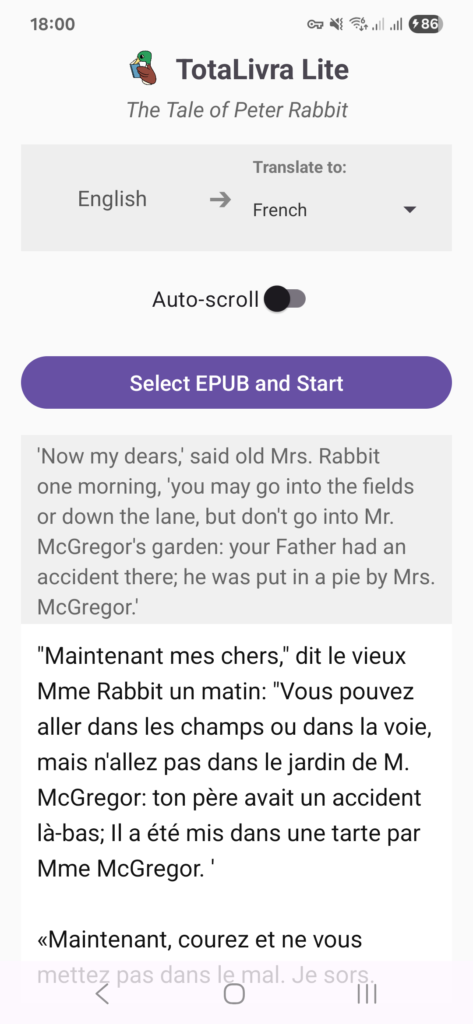
- On-Device Translation Engine: Why wait or pay for API keys? TotaLivra Lite directly utilizes Google’s ML Kit for on-device translation. Experience ultra-fast, seamless eBook translation directly on your Android smartphone without the heavy processing overhead.
- 100% Offline & Private: No cloud APIs, no subscriptions, and zero data tracking. TotaLivra Lite works entirely on your local machine using Google’s downloaded translation models, ensuring your private documents never leave your device.
- Flawless EPUB Repacking: Simply drop an eBook, and get a translated eBook back. The app extracts, translates, and seamlessly repacks your
.epubfiles while perfectly preserving original images, chapter structures, and metadata. - Dual-Pane Reading Experience: Watch the translation happen live. The app features a synchronized dual-pane view, allowing you to easily compare the original text with the translated output on a single screen.
Download
[System Requirements]
Note: TotaLivra Lite relies on Google’s on-device translation models. You will need an internet connection during the first use to securely download the required language packs (approx. 30MB) via Google Play Services.
Memory (RAM): 2GB or more (Very lightweight compared to local LLM applications). OS: Android 7.0 (Nougat) or later. Architecture: Optimized for modern Android smartphones.
[Frequently Asked Questions]
Q: What is the difference between TotaLivra and TotaLivra Lite for Android?
A: The standard TotaLivra application uses massive, studio-grade local Large Language Models (like Gemma or Qwen) requiring high-end hardware (32GB-64GB RAM) to deliver nuanced, professional-level literary translations. TotaLivra Lite uses Google’s native on-device translation for ultra-fast, lightweight, and casual reading on mobile devices.
Q: What file formats are supported?
A: TotaLivra Lite currently supports DRM-free .epub (eBooks) files. It automatically generates a fully formatted, translated .epub file as the output.
Q: Why did the app ask to download a model from Google Play Services?
A: Since the app is fully offline, it requires official Google language dictionaries to function. If you haven’t downloaded a specific language pair yet, the app will safely pause and prompt you to download them for free directly from Google.
Q: Are there any character limits?
A: No. There are no character limits, hourly caps, or hidden fees. Translate as many full-length novels or documents as you want.
TotaLivra Lite for Windows
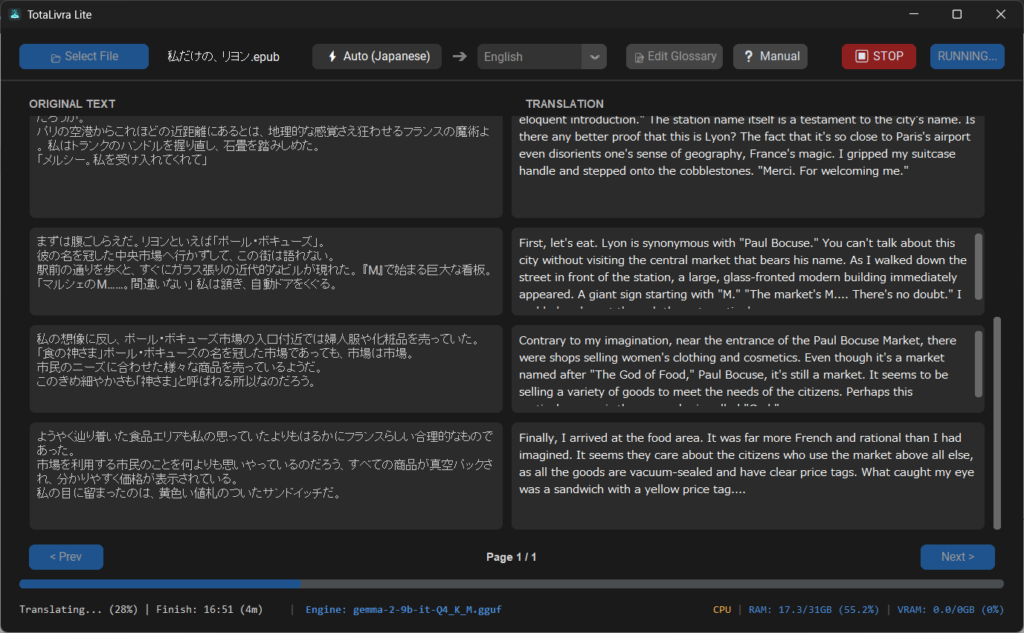
Translate foreign text files (TXT, EPUB) securely using your CPU. No dedicated GPU required. Powered by the advanced Gemma-2 AI
Securely available on the Microsoft Store for easy installation and automatic updates.